area map calendar
App Chat With Us Industry Resources Meetings Group Tour Media Blog Newsletters About Us Move To Cleveland

Things To Do

Things To Do Major Attractions Arts And Entertainment Culture Experiences And Tours Holiday Family Friendly Music Nightlife Outdoors Shopping Sports Spring Summer Fall Winter Search Things To Do Destination Cleveland App

FEATURED

We are so back.

Destination Cleveland App

The Destination Cleveland Mobile App has returned, and it’s brought new functionality that makes it even easier to find your way around The Land and plan a trip filled with our greatest hits, hidden gems and everything in between, all in a world-class city that doesn’t take itself too seriously.

Events

Events Events This Weekend Event Calendar Annual Events Annual Events PDF Monthly Events PDF Submit an Event Destination Cleveland App

FEATURED

We are so back.

Destination Cleveland App

The Destination Cleveland Mobile App has returned, and it’s brought new functionality that makes it even easier to find your way around The Land and plan a trip filled with our greatest hits, hidden gems and everything in between, all in a world-class city that doesn’t take itself too seriously.

Eat and Drink

Eat and Drink Downtown Restaurants Bakeries and Sweets Bars and Breweries Coffee, Brunch and Breakfast Search Places to Eat and Drink Destination Cleveland App

Featured

2026

Brewery Passport

Few towns can boast a craft beer pedigree like Cleveland. We’ve brought together many of our finest breweries to create the Cleveland Brewery Passport: a unified way for you to explore everything this city has to offer without going thirsty.

Where To Stay

Where to Stay Search Where to Stay Downtown Cleveland Hotels Cleveland Airport Hotels University Circle Hotels Search all Hotels Search Bed and Breakfasts Search Campgrounds Search Resorts Search Short Term Rentals Search Meeting Venues Destination Cleveland App

Planning Tools

Planning Tools Know Before You Go Destination Cleveland App Trip Planner Chat With Us Cleveland Visitors Center Deals & Special Offers Getting to Cleveland Accessibility Maps Health & Safety Subscribe to e-Newsletters Request an Official Insider Guide Transportation in Cleveland Travel Inspiration Official Insider Guide Guía Oficial de Cleveland LGBTQ+ Insider Guide

FEATURED

We are so back.

Destination Cleveland App

The Destination Cleveland Mobile App has returned, and it’s brought new functionality that makes it even easier to find your way around The Land and plan a trip filled with our greatest hits, hidden gems and everything in between, all in a world-class city that doesn’t take itself too seriously.

Neighborhoods

Neighborhoods Downtown Cleveland Cleveland Neighborhoods Cleveland Suburbs Cleveland Region Destination Cleveland App

TV

TV The Land for Life Cleveland Creatives Legends of The Land Podcast

Featured

Answering those burning questions we all have about Cleveland

Legends of The Land Podcast

This is Legends of The Land, a podcast series that centers on some of those absolutely burning questions we all have about Cleveland — the kind of stuff no one is talking about – but probably should.

Brag

The Brag Hub Brag Coach Upcoming Events Join the Brag Crew

Featured

Your hype man for The Land

The Cleveland Brag Coach

The Cleveland Brag Coach is your go-to hype man for The Land who’s built to back it up and call it like it is. When someone takes a shot at Cleveland, he doesn’t hesitate. He responds with proof, pride and just the right amount of attitude. The Brag Coach turns clapbacks into content and everyday moments into posts that travel. Part strategist, part storyteller, he helps craft captions, replies and stories that hit.

« Back to Digital Handbook

Events

Widgets Child Page #2 Child Page #2
Locations
Events Approving Submitted Events Editing / Removing Events Copying Events Creating Events Event Submission Form Event Submission Guidelines Searching Events

Creating Events

Before You Begin

1. Does the event meet our event submission guidelines?

Don't create extra work by adding an event that shouldn't be on the event calendar. Event submission guidelines can be found on the following page: https://www.thisiscleveland.com/things-to-do/submit-an-event/#guidelines


2. Is the event already in the event calendar?

Duplicates suck so make sure the event you're about to add isn't already in the event calendar. There are a few ways to check the calendar for duplicates, feel free to use the method that is most comfortable for you:

  • Event Management Module: How to search events
  • Pages Module: How to search events

3. Does the event occur annually?

If so you might be able to save some time by making a copy of the event from a prior year. There are a few ways to search for past events, feel free to use the method that is most comfortable for you:

  • Event Management Module: How to search events
  • Pages Module: How to search events

If a past version of the event is in our calendar you can make a copy of the event by using either of the following methods:

  • Event Management Module: How to make a copy of an event
  • Pages Module: How to make a copy of an event

Lastly, don't forget to include the year in the name of the event when you create it to help identify it from other years.


4. Does the event location / venue exist as a location in Kentico?

You'll want to make sure the location for the event has already been created before adding the event. There are a few ways to search existing locations, feel free to use the method that is most comfortable for you:

  • Locations Management Module: How to search for a location
  • Pages Module: How to search for a location

If the location doesn't exist you'll need to create a new one. There are a few ways to create a new location, feel free to use the method that is most comfortable for you:

  • Locations Management Module: How to create a new location
  • Pages Module: How to create a new location

5. Do you have an image for the event and have you formatted them properly?

Every event needs at least a thumbnail image and, if possible, an open graph image. Additionally, if the event is also a featured event it will need a featured banner image as well. Specs for all three images are:

  • Thumbnail: 600 x 600 pixels
  • Open Graph: 1200 x 630 pixels
  • Featured Banner: 1920 x 720 pixels

Now That You're Ready

Feel free to use the method that is most comfortable for you:

  • Event Management Module: Adding a new event
  • Pages Module: Adding a new event
  • Event Management Module: Bulk uploading events
  • Back to top

Searching Events

Event Management Module

1. Click on the Event Management Module
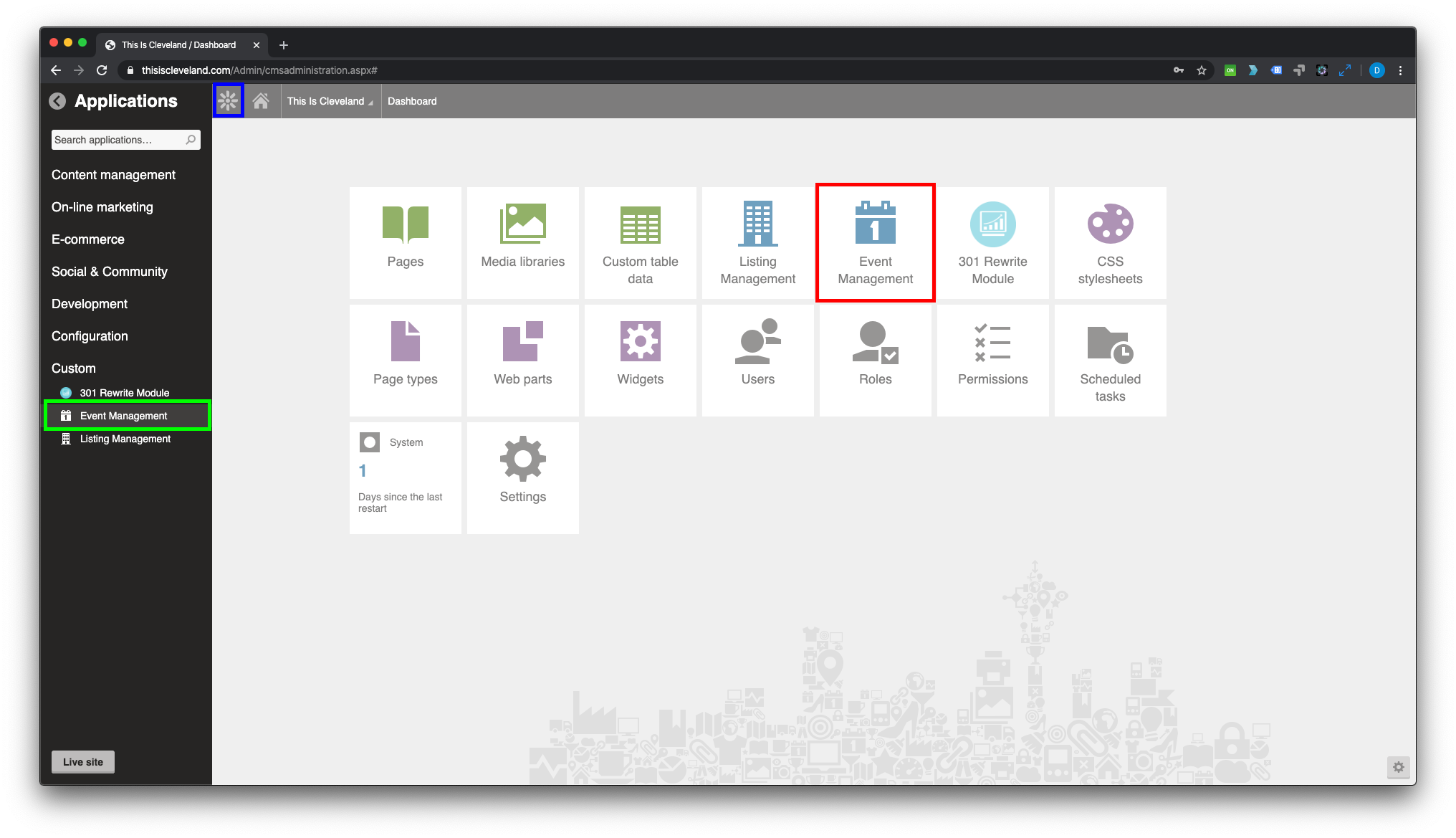
This can be found on your Kentico home screen if it is pinned (red) or by clicking on the Kentico Menu (blue) and navigating to Custom > Event Management (green).


2. Select the appropiate option from the Event Management Module's left hand menu (red).
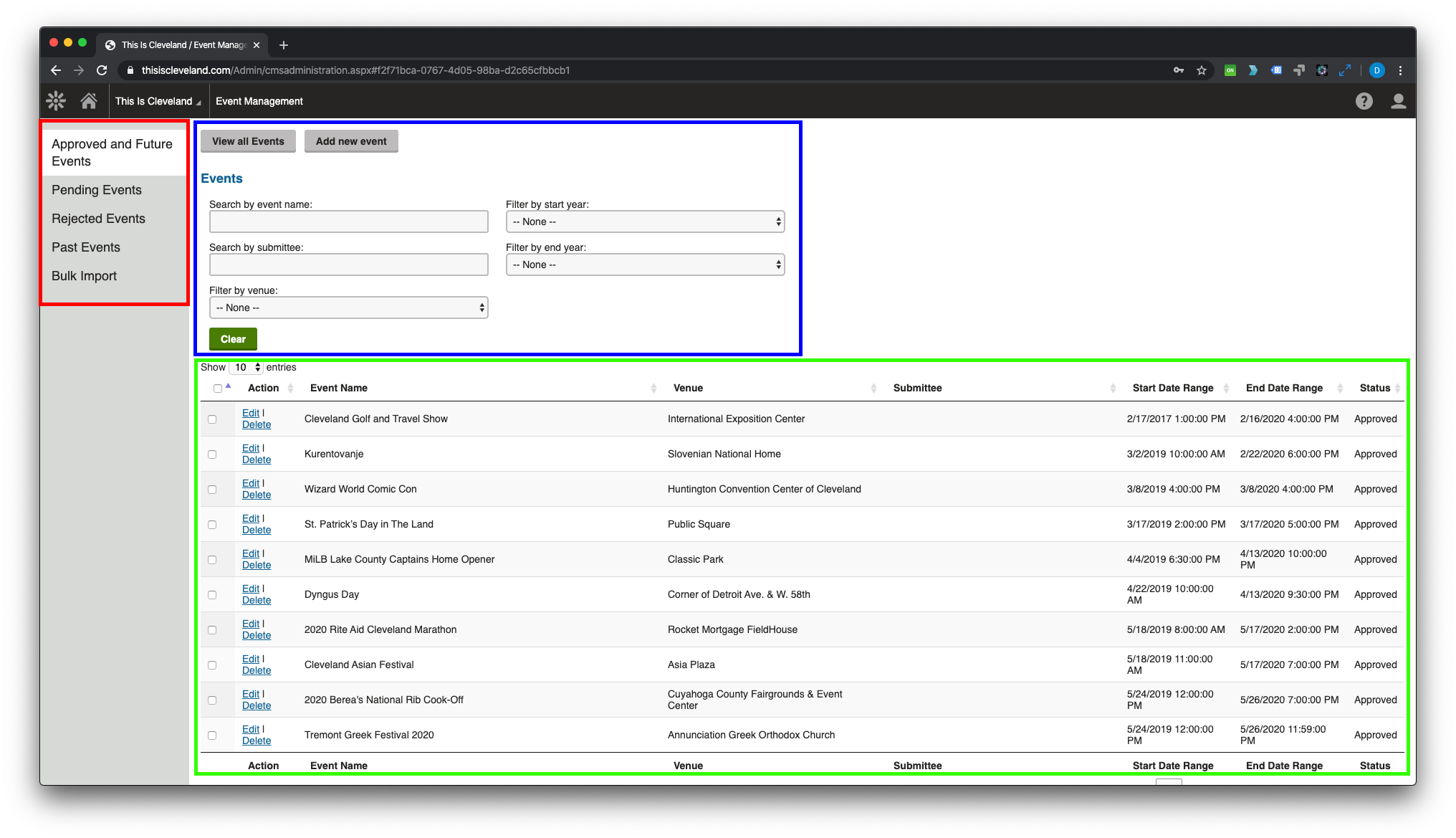
Approved and Future Events These are events that have been approved that occur either today or in the future and appear on the website.
Pending Events These are events that have been submitted using the public event submission form on the website that are awaiting approval.
Rejected Events These are events that were submitted using the public event submission form on the website and were rejected.
Past Events These are events that have been approved that occur in the past and no longer appear on the website.

3. Search for an event using the appropriate filters (blue).

Results will appear below the search filters (green).

  • Back to top

Pages Module

1. Click on the Pages Module
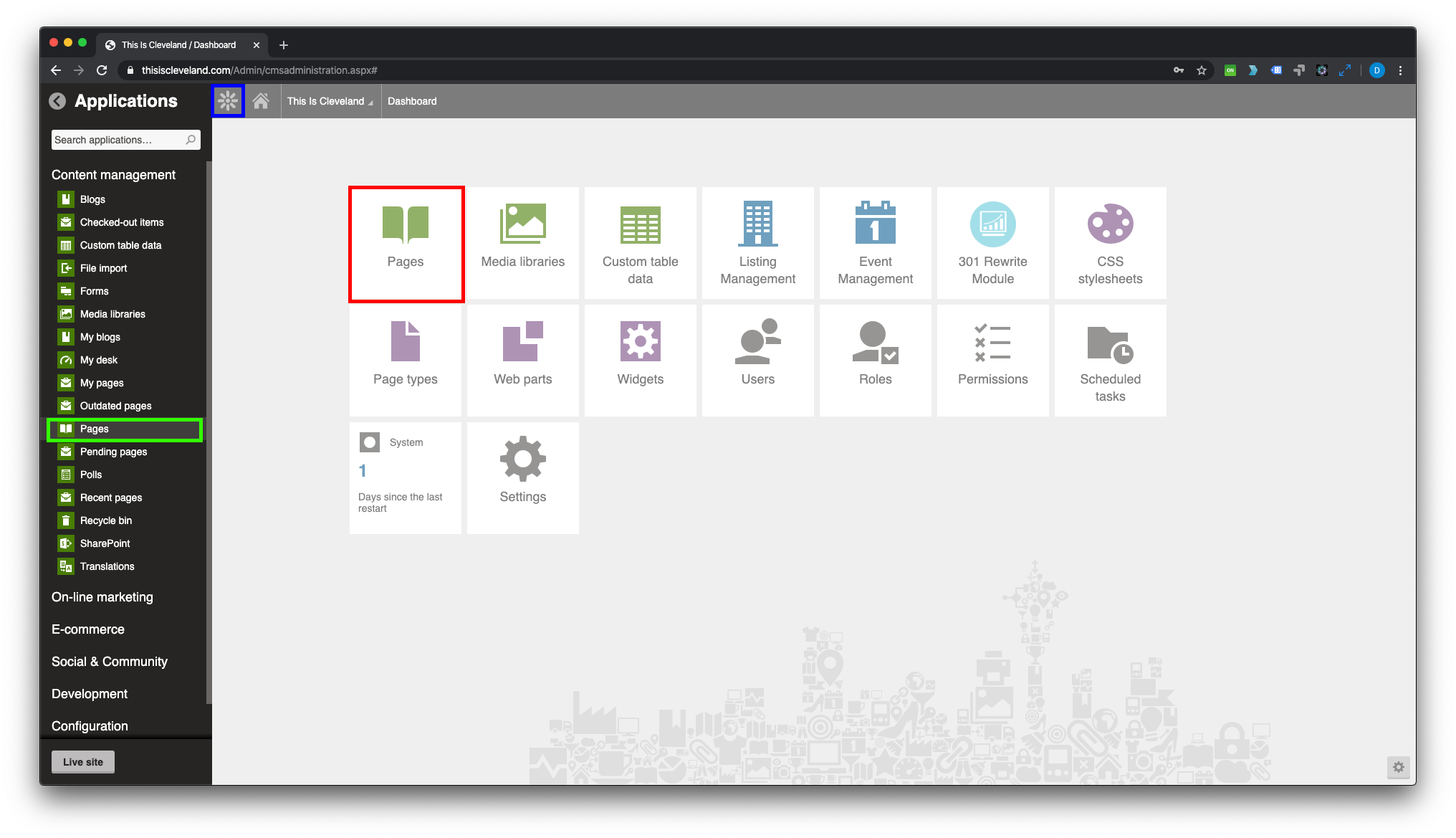
This can be found on your Kentico home screen if it is pinned (red) or by clicking on the Kentico Menu (blue) and navigating to Content Management > Pages (green).


2. Click on the Events folder in the folder tree of the Pages Module.
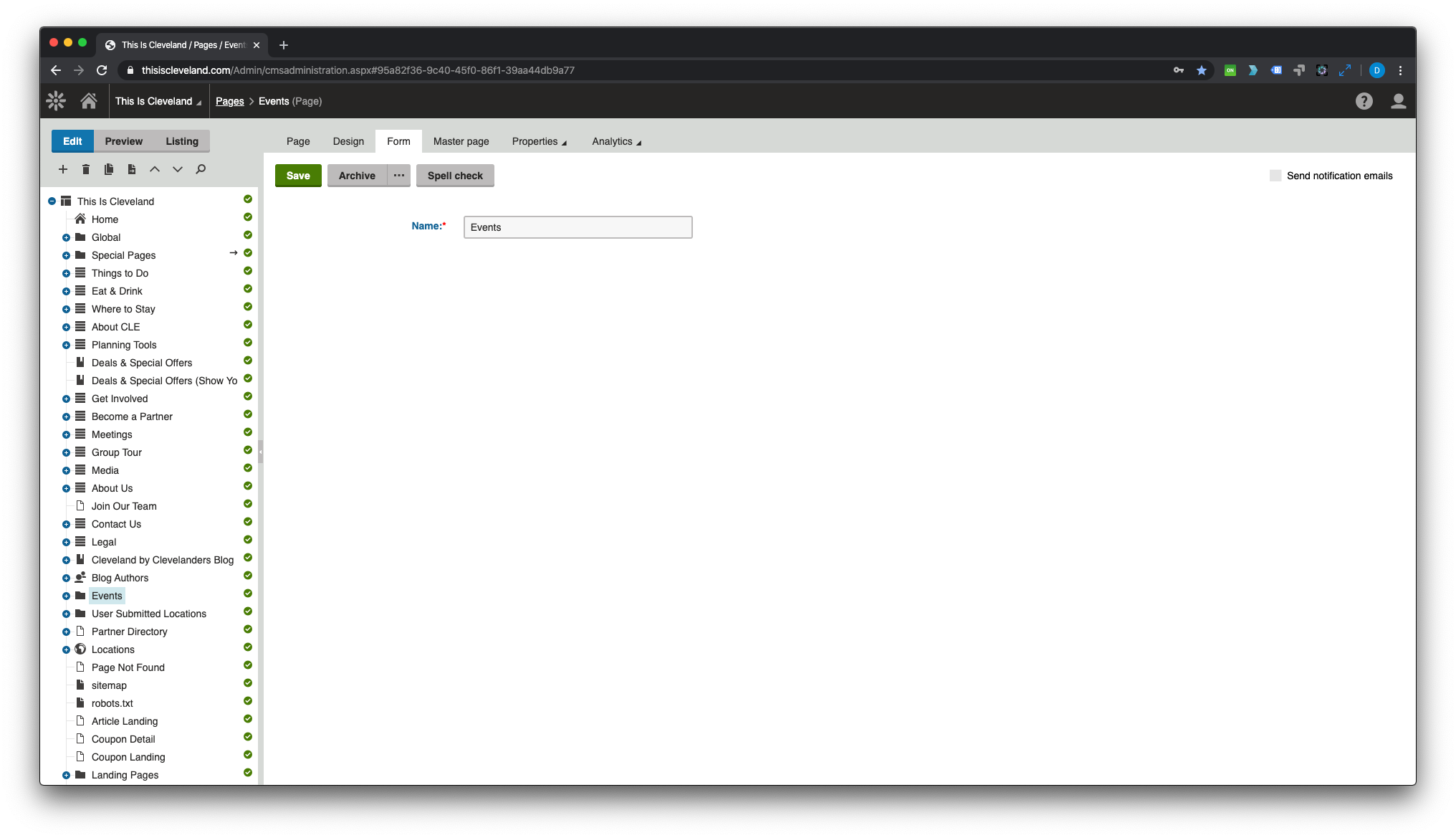
Depending on how many items appear in the folder tree you may need to scroll to find the Events folder.


3. Click on Listing (red) at the top of the folder tree of the Pages Module.
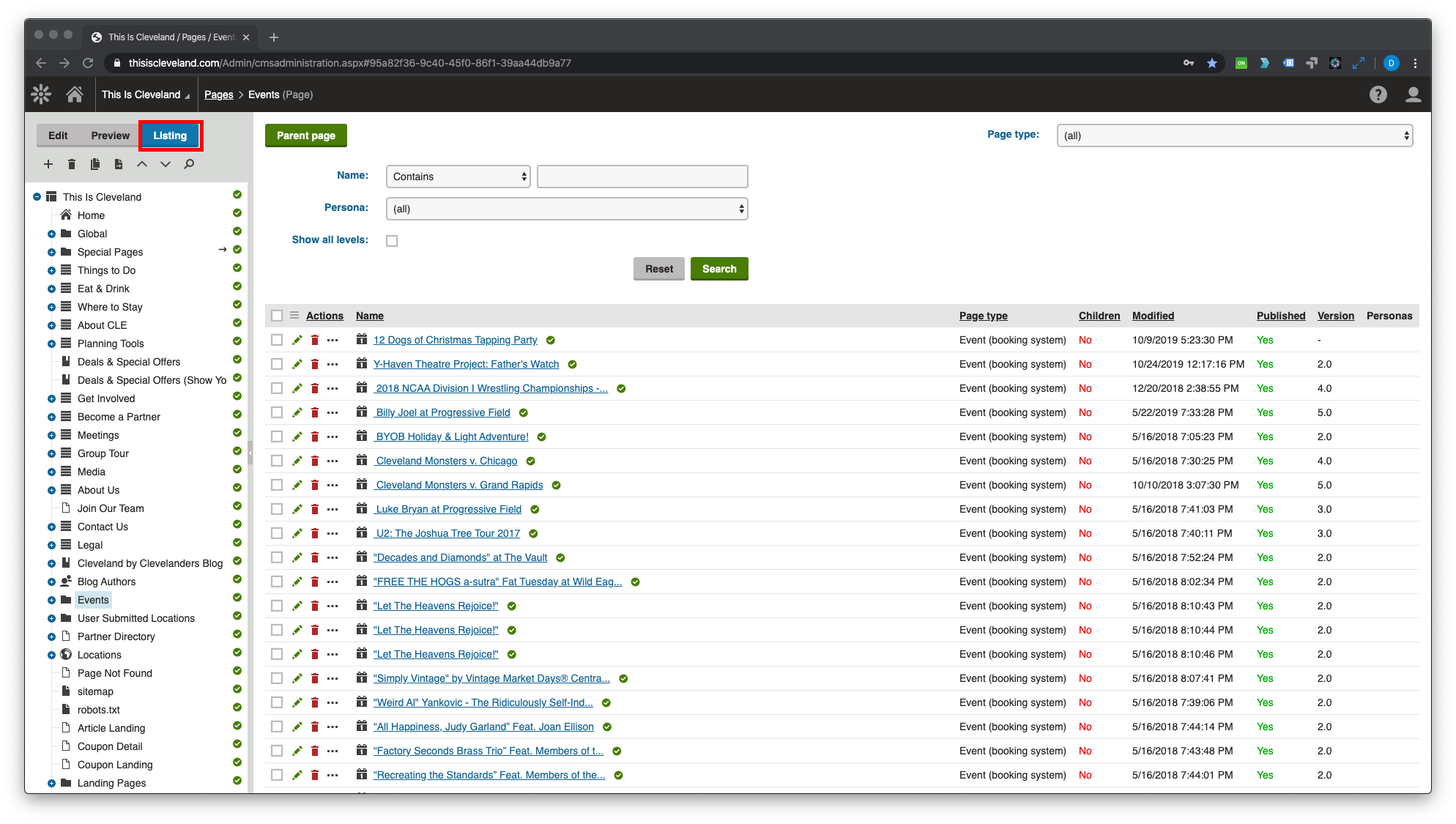
This will put the Pages Module into the Listing view.


4. Search for an event by using the appropriate filters (blue) and clicking the Search button (red).
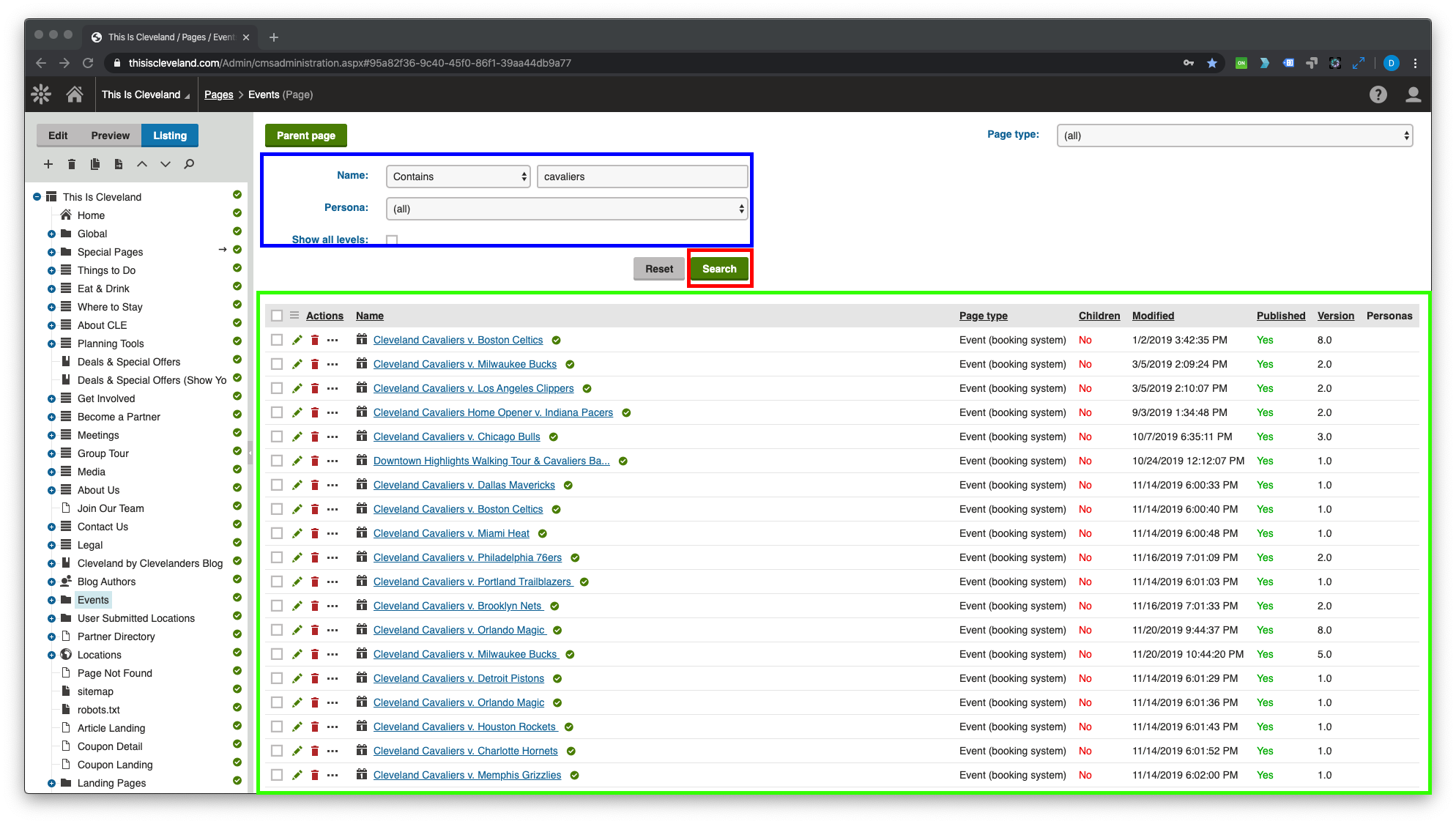
Results will appear below the search filters (green).

  • Back to top
Things To Do Events Eat and Drink Where To Stay Planning Tools Neighborhoods
Meetings Group Tour Media Partners Partner Extranet About Us Move To Cleveland Jobs Contact
Copyright © 2026 Destination Cleveland
Privacy Terms of Use Legal Sitemap